From OAuth to live scores in under 10 minutes.
Connect your CRM, tell ax1om what a conversion looks like, and watch a LightGBM model train on your own history. Every score ships with a SHAP explanation and a Feature Stability Score, so you know what drove the prediction and whether that reasoning will still hold next quarter.
Four steps, one sitting.
The same flow every user walks through, from first login to scores landing in Salesforce. No consulting engagement, no data science team, no manual exports.
Connect your CRM in one OAuth click.
Sign in with Google or email, then authorize Salesforce or HubSpot via their standard OAuth flow. ax1om reads your schema, objects, and record counts automatically. No Salesforce admin involvement. No exports. Read-only access by default.
- Salesforce via REST, SOQL, and Bulk API 2.0
- HubSpot via REST + CRM Export API
- CSV import if you prefer to start offline
- Tokens encrypted with Fernet before they ever touch the database
Tell ax1om what you're trying to predict.
Pick the object (Lead, Account, Opportunity), define what counts as a conversion (for example, Opportunity stage is Closed Won), and review the fields ax1om auto-classifies as predictive based on your data. The classifier flags fields as recommended (populated in more than half your records), suggested, or excluded, so you rarely need to touch it manually.
- Lead, Account, or Opportunity scoring with one click
- Success criteria from any field or combination
- Fields auto-classified by population rate and stability
- Mark sensitive fields for exclusion before training
Train a LightGBM model on your own history.
Click Train. ax1om pulls your data fresh from the CRM, engineers features per field type, trains a LightGBM gradient boosting classifier on your closed-won and closed-lost records, computes SHAP values, and measures Feature Stability Score across validation folds. Most models finish in under 10 minutes.
- Fresh data on every run, no sync lag
- LightGBM binary classification, tuned per dataset
- SHAP via TreeExplainer on every record
- Feature Stability Score to measure how durable the explanations are
Put scores where your reps already work.
Scores and explanations flow out through four delivery channels. Pick the ones that match how your team works: a CSV export, automatic writeback to Salesforce or HubSpot fields, a Live API endpoint for real-time scoring inside workflows, and scheduled Score Maintenance that keeps everything fresh every week.
- CSV export of every scored record
- CRM writeback into dedicated score fields you control
- Live API scoring with 5 to 20 ms inference after warm-up
- Weekly Score Maintenance on an automatic schedule
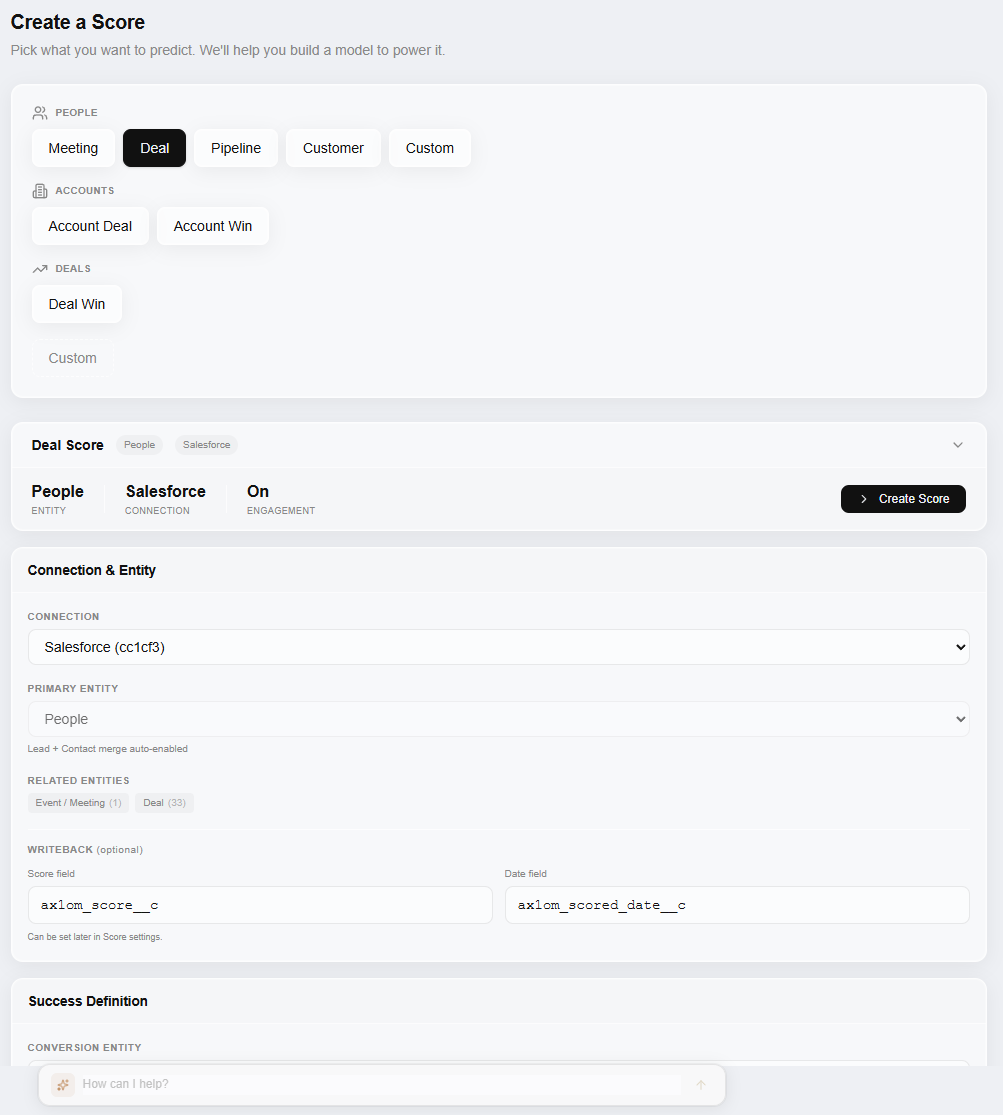
This is what it actually looks like.
Pick your scoring intent, connect your CRM, define what counts as a conversion, and configure writeback fields. No consulting engagement, no code.
Three scores, not one.
Every output maps to a separate question. Each comes with SHAP explanations showing which CRM fields drove it.
ICP fit score
Account-level score answering "right company?" Trained on your closed-won history, not industry benchmarks. SHAP values show which firmographic and behavioral fields matter most.
Contact priority
Person-level score answering "right person?" Ranks contacts within qualified accounts so reps know who to reach first. Explanations cite title, engagement, and role signals.
Timing signal
In-market timing score answering "right time?" Detects buying signals in activity patterns and pipeline velocity so your team engages when it matters, not when it's convenient.
What actually happens when you click Train.
No black box, no proprietary magic number. The pipeline is boring on purpose: well-understood gradient boosting, published explainability methods, and no cross-customer data ever.
Fresh data, every run.
A Cloud Run Job spins up, pulls your CRM data live through the existing OAuth connection, assembles the training dataset, and engineers features per field type. Nothing is cached between runs. Nothing is warehoused. Your CRM stays the single source of truth.
LightGBM, one per org.
Every model is trained on a single organization's data. No cross-customer model training, no shared feature stores, no transfer learning from other tenants. LightGBM binary classification is the default, with tree depth and learning rate tuned per dataset.
SHAP + Feature Stability.
After training, SHAP TreeExplainer runs across every record and produces per-prediction feature attributions. Then ax1om measures Feature Stability Score across validation folds, so you can tell a reliably important field from one that only looked important in a single cut of the data.
Organization-scoped storage.
The trained model, feature transformers, feature schema, per-record scores, and SHAP values all land in Google Cloud Storage under an organization-scoped path. No other customer's artifacts share that path. Inference against the Live API uses the same artifacts, cached in memory for 5 to 20 ms latency.
How each field type becomes a feature.
ax1om handles each field type with a strategy that's right for gradient boosted trees. No manual normalization, no one-size pipeline, and no silent failure on messy columns.
| Field type | Strategy | Notes |
|---|---|---|
| Numeric | Used directly | Null handling per column. No scaling required for tree models. |
| Categorical (≤30 values) | One-hot encoded | Each value becomes its own binary feature. |
| Categorical (>30 values) | Target-encoded or dropped | High-cardinality fields use target encoding or fall out of the model to prevent overfitting. |
| Boolean | Binarized | Converted to 0 or 1 with explicit null handling. |
| Date | Used for filtering | Drives cutoffs and conversion timing, not features directly. |
| Text | Currently dropped | NLP / embedding support is on the roadmap, not in production yet. |
We diagnose your data before training.
Population rate, correlation, information value, SHAP impact, and a predictive strength label on every field. Fix data quality issues before they hurt your model.
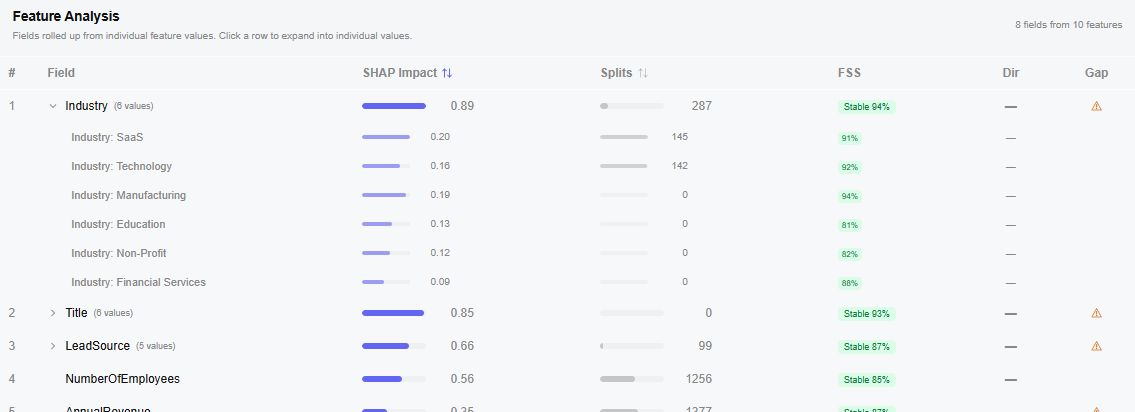
What you see after training finishes.
Not just a score. A full view of how the model performs, why each record landed where it did, and whether the explanation will survive your next retrain.
AUC and lift curve
Standard classification metrics so you can judge whether the model is worth deploying before you wire it into anything.
SHAP feature importances
Per-record SHAP values showing exactly which fields drove each prediction. No mystery scores, no hand-wavy explanations.
Feature Stability Score (FSS)
A 0-to-1 measure of how consistent each feature's importance is across validation folds. High FSS means the explanation will hold up when you retrain next quarter.
Score distribution
Histogram of conversion likelihood across your records so you can set sensible routing thresholds.
Field diagnostics
Per-field population rate, unique values, stability, and correlation with the target. Fix data quality issues before they hurt your model.
Your CRM, unmodified by default.
ax1om requests read-only CRM access by default. Writeback is opt-in and only touches fields you explicitly designate for scores. OAuth tokens are Fernet-encrypted before they reach the database. PII is stripped from stored model artifacts so only aggregated features and scores persist long-term.
The full posture on infrastructure, encryption, isolation, and incident response lives on the security page. The privacy policy covers data retention, GDPR and CCPA rights, and subprocessor list.
Common questions.
How long does training actually take?
Most models finish in under 10 minutes. Larger datasets with more than 100,000 records can take up to 30 minutes on the first run. Subsequent retrains are usually faster because the schema and feature transformers are cached.
What if my CRM data is messy?
That's the normal starting condition, not the exception. ax1om's field diagnostics call out population rate, outlier rates, and stability issues per field before training. You can mark problem fields as excluded, and the classifier will down-weight sparse or noisy columns automatically.
Do you sync my CRM data into a warehouse?
No. ax1om pulls data fresh from your CRM on every training run. No nightly sync, no data warehouse middleware, no stale feature store. The CRM stays the single source of truth, and your training data reflects whatever it looks like at the moment you click Train.
Can I see which fields the model used?
Yes. Every score comes with a SHAP explanation showing the top contributing fields and their directional impact. You also get a Feature Stability Score on each field so you can tell the difference between a feature that consistently matters and one that only looked important by accident in a single fold.
How does writeback work in Salesforce and HubSpot?
You designate a custom field on each object (Lead, Account, Opportunity, or HubSpot Contact / Company / Deal) and ax1om writes the current score and optionally a SHAP summary to those fields. Writeback only touches the fields you map. It never modifies your own data.
What runs behind the scenes when I click Train?
A separate Cloud Run Job (`ax1om-train`) spins up, pulls your data fresh, runs feature engineering, trains LightGBM, computes SHAP values with TreeExplainer, measures Feature Stability Score across folds, and writes artifacts (model, scores, SHAP values, feature builders, schema, metadata) to organization-scoped Google Cloud Storage. Then it updates your run status in the dashboard.
See your AUC on your own data.
The activation moment takes about 10 minutes from connection to first score. No sandbox with fake data, no generic benchmarks, no guessing what the model would do on your pipeline. Your CRM, your history, your conversion criteria, your model.